


Common Anode RGB LED vs Common Cathode RGB LED: 5050 SMD Pinout and Buying Guide
25 June, 2026

If you’re designing wearable devices, you’ve probably noticed that SMD LEDs are the standard choice for everything from status indicators to health monitoring displays. Their miniature size and surface-mount design make them ideal for compact products like smartwatches and fitness bands. The reality is that integrating SMD LEDs in wearable devices comes with serious challenges—limited battery life, thermal management issues, manufacturing difficulties, and durability concerns can all derail your project.

Wearables have tiny batteries—smartwatches use 300-400mAh, fitness bands only 100-150mAh. A standard 20mA LED can drain a fitness tracker’s daily power in a few hours. Users want bright notifications and accurate sensors, but also several days of battery life. Every milliamp must be managed carefully.
The table below compares power consumption and battery life impact across different LED current levels:
| LED Current | Power Consumption (at 3V) | Continuous Runtime on 150mAh Battery | Typical Battery Life with Normal Usage | Power Savings vs. Standard |
| 20mA (standard) | 60mW | 7.5 hours | 2-3 days | Baseline |
| 10mA | 30mW | 15 hours | 4-5 days | 50% reduction |
| 5mA | 15mW | 30 hours | 5-7 days | 75% reduction |
| 2mA (ultra-low) | 6mW | 75 hours | 7-10 days | 90% reduction |
| 1mA (status only) | 3mW | 150 hours | 10+ days | 95% reduction |
Start with LEDs designed for battery devices. Choose LEDs rated for 2-5mA instead of 20mA models—this alone cuts power by 75-90%. For status lights, use specialized 1mA LEDs. Switching from 20mA to 2mA LEDs increases battery life from 2-3 days to 7-10 days in typical fitness trackers.
Use Pulse Width Modulation to control brightness efficiently. Set PWM frequency above 1kHz to avoid visible flicker. Adjust duty cycle to match needs—50% duty cycle cuts power in half. Add ambient light sensors that boost brightness outdoors and reduce to 10-20% indoors automatically.
Replace resistors with dedicated LED driver ICs. Use constant-current drivers for precise control without wasted energy. Enable wear detection to turn off LEDs when the device is removed. Set LEDs to activate only for notifications, measurements, or gestures.
Choose driver chips with 1-10 microamp sleep current instead of several milliamps when active. Confirm wake-up takes under 1 millisecond. Design for typical use where a notification LED runs 2-3 seconds per alert and sleeps the rest of the time.
For heart rate monitors, flash LEDs only when taking readings every 1-5 seconds. Add 30-50% PWM duty cycle during measurements. This reduces sensor power by 90-95% compared to always-on operation.
Extending battery life needs multiple approaches working together. Start with low-power LEDs, add PWM and smart drivers, then optimize for your application. Test with real hardware and usage patterns to confirm your power savings meet battery life goals.
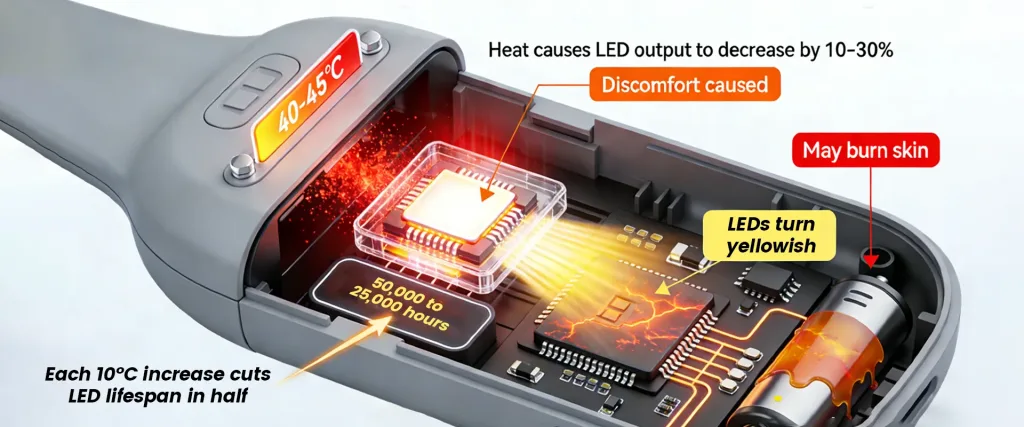
LEDs generate heat, and sealed wearable cases trap it with no airflow. Temperatures above 40-45°C feel uncomfortable, over 50°C can burn skin. Heat reduces LED output by 10-30% and shifts color—white LEDs turn yellowish. Each 10°C increase cuts LED lifespan in half, from 50,000 to 25,000 hours. Heat also damages nearby processors, sensors, and batteries.
The table below shows thermal performance characteristics of different PCB substrate options:
| PCB Substrate Type | Thermal Conductivity | Heat Dissipation Capacity | Relative Cost | Best Applications |
| Standard FR4 | 0.3-0.4 W/m·K | 1-2W | 1x (baseline) | Low-power status LEDs, basic indicators |
| FR4 with thermal vias | 0.5-0.8 W/m·K | 2-3W | 1.1-1.2x | Moderate-power notifications, pulsed sensors |
| Aluminum core PCB | 1-2 W/m·K | 3-5W | 2-3x | Display backlighting, continuous sensors |
| Ceramic substrate | 20-30 W/m·K | 5-10W | 4-6x | High-power medical sensors, intensive applications |
Use the circuit board to move heat away from LEDs. Add 4-9 thermal vias under each LED—small plated holes that connect to inner copper layers or the back of the PCB. Create large copper areas that spread heat across a wider surface. For high-power applications, use aluminum core PCBs that conduct heat 3-5 times better than standard FR4, though they cost 2-3 times more.
How you run LEDs affects heat generation. Limit duty cycle to 30-50% instead of continuous operation—this cuts heat proportionally. Use short bursts with cooling periods between them. A 100ms flash every second generates less heat than continuous 10% brightness. Add automatic brightness reduction when temperature sensors detect the device getting hot.
Find thermal problems before building hardware. Use software like ANSYS or SolidWorks Flow Simulation to predict LED temperatures. Identify where heat concentrates and adjust component placement early. Input accurate thermal values for your PCB material, copper thickness, and enclosure to get reliable results.
Place LEDs away from other heat sources. Keep at least 5-10mm distance from processors, power regulators, and similar components. Position LEDs near board edges or openings where heat escapes easier. Space multiple LEDs apart to prevent one from heating its neighbors.
Select LEDs with low thermal resistance (°C/W)—lower numbers mean better heat transfer. A 100°C/W rating means temperature rises 100°C per watt dissipated. Use LEDs rated for 125-150°C junction temperature instead of 85-100°C models. Specify packages with exposed thermal pads on the bottom for efficient heat transfer.
Managing heat needs several techniques working together. Design PCBs with thermal vias and copper spreaders, position components to avoid heat buildup, control duty cycles and brightness, and choose LEDs with good thermal characteristics. Run simulations to verify your design works before production. Each method handles part of the problem—using just one approach rarely controls heat enough for comfortable, reliable wearables.
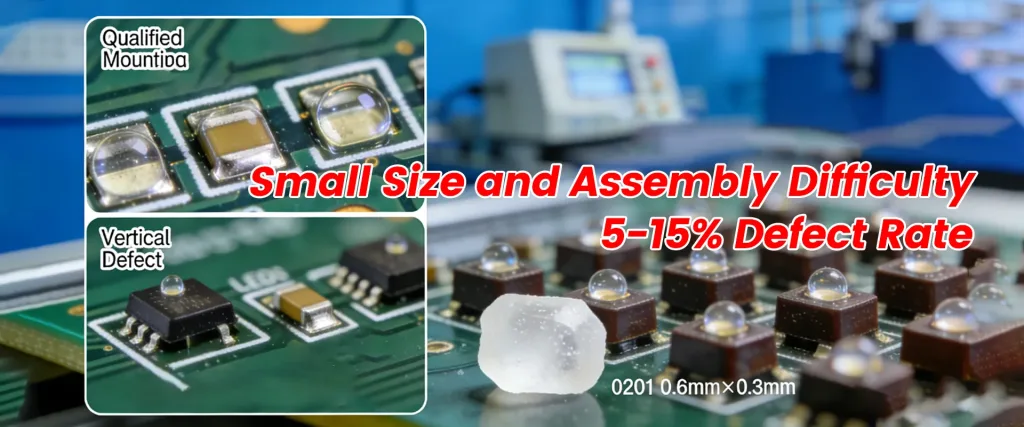
The smallest LEDs create serious production challenges. A 0201 package measures only 0.6mm × 0.3mm—smaller than a grain of salt. They need ±0.05mm placement accuracy, and small pads mean weak solder joints that crack easily. Without optimized processes, defect rates hit 5-15%. Defects like tombstoning, insufficient solder, or misalignment are hard to spot.
The table below shows how assembly difficulty increases as LED package size decreases:
| LED Package Size | Dimensions | Placement Accuracy | First-Run Defects | Assembly Speed |
| 0201 | 0.6mm × 0.3mm | ±0.05mm | 5-15% without optimization | 5,000-10,000 parts/hour |
| 0402 | 1.0mm × 0.5mm | ±0.08mm | 3-8% without optimization | 8,000-15,000 parts/hour |
| 0603 | 1.6mm × 0.8mm | ±0.10mm | 1-5% without optimization | 15,000-25,000 parts/hour |
| Standard components | 3mm+ | ±0.15mm | <1% | 20,000-30,000 parts/hour |
Standard machines cannot handle the smallest LEDs. Install vision systems with 5-10 micron accuracy for correct positioning. Use specialized vacuum nozzles that won’t damage tiny packages. Accept slower speeds—5,000-10,000 parts per hour instead of 20,000-30,000 to maintain accuracy. Add vibration isolation since any movement affects placement at this scale.
Modify stencil specs for small LEDs. Use 75-100 micron thickness instead of standard 125 microns to prevent excess solder. Set apertures to 90-95% of pad size for precise paste volume. Specify laser-cut stencils instead of chemically etched for better accuracy. Apply nano-coatings for clean paste release.
Small components heat and cool faster than large ones. Lower peak temperature by 5-10°C to 235-240°C to prevent damage. Limit time above melting point to 40-60 seconds. Keep heating rate at 2-3°C per second to avoid thermal shock. Attach thermocouples to the PCB near LEDs to measure actual component temperature, not just air temperature.
Visual inspection doesn’t work at this scale. Use automated optical inspection (AOI) to scan every board for misalignment, missing parts, or bad solder. Add X-ray inspection to check hidden joints under components. Set systems to flag placements off by more than 0.1mm. Manually check 5-10% of boards under microscope to verify automated systems catch defects.
Board design affects assembly success. Space pads at least 0.3mm apart for 0402 LEDs and 0.2mm for 0201 LEDs to prevent solder bridges. Use exact pad dimensions from datasheets—even 0.05mm matters. Add three fiducial markers per board for machine alignment. Leave 1-2mm clearance around LEDs for rework. Include clear polarity marks since LED markings are too small to read.
Manufacturing tiny LEDs reliably requires attention to every process step. Design PCBs with correct pad layouts and clearances. Work with your manufacturer to optimize equipment, stencils, and reflow profiles for your specific LED packages. Implement thorough inspection and expect to adjust the process during initial runs. With optimization, defect rates drop from 5-15% to under 1%.
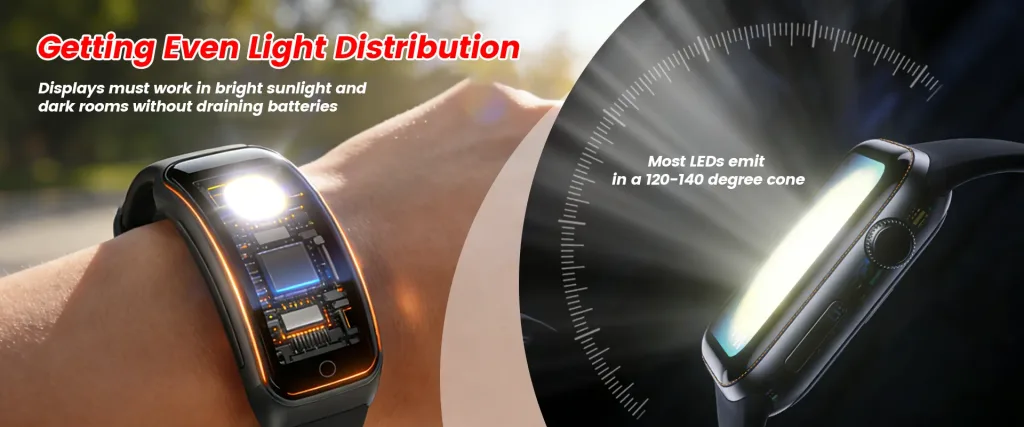
Curved surfaces make uniform lighting difficult—flat LEDs on curved cases create bright spots above and dark edges. Light leaks around displays or reflects off internal parts. Most LEDs emit in a 120-140 degree cone, so brightness drops at angles. Displays must work in bright sunlight and dark rooms without draining batteries.
The table below compares common light distribution solutions and their trade-offs:
| Solution | Thickness | Light Loss | Uniformity | Relative Cost | Primary Benefit |
| No diffuser | 0mm | 0% | Poor | Baseline | Maximum brightness |
| Thin optical film | 0.1-0.3mm | 10-20% | Moderate | 1.2-1.5x | Minimal thickness increase |
| Standard diffuser | 0.5-1.0mm | 30-40% | Good | 1.5-2x | Balanced performance |
| Thick diffuser | 1.5-2.0mm | 40-50% | Excellent | 2-2.5x | Best uniformity |
| Light guide + diffuser | 0.5-2.0mm | 25-35% | Excellent | 2-3x | Edge-lit configurations |
Use light guides to spread LED output across larger areas. Install thin plastic sheets (0.3-1.5mm thick) between LED and display. Add etched or printed patterns that scatter light evenly—denser near the LED, sparser farther away. Consider edge-lit designs that position LEDs on the side instead of behind, reducing thickness. Select acrylic or polycarbonate based on your application needs.
Add diffusers to eliminate bright spots. Use thick diffusers (0.5-2mm) when uniformity matters most, accepting 30-50% brightness loss. Select thin films (0.1-0.3mm) when thickness is tight, accepting moderate uniformity with 10-20% loss. Use polycarbonate for impact resistance in sports wearables. Choose acrylic for maximum light transmission when durability is less critical.
Place LEDs 2-5mm back from the visible surface and add a diffuser to eliminate hot spots. Use multiple LEDs spaced 10-20mm apart instead of one bright LED for larger areas. Angle LEDs slightly outward to direct light toward edges where brightness drops. Avoid placing LEDs too close to curved surfaces where light can’t spread evenly.
Several small LEDs often work better than one large LED. Arrange multiple small LEDs (like three 0603 packages) in triangular or linear patterns. Enable independent control of different zones for varied notifications. Get redundancy—if one fails, others keep working. Achieve better uniformity by spreading light sources across the area.
Install small photodiodes that measure ambient light every few seconds. Program automatic adjustment across 5-10 brightness steps. Increase LED current in sunlight for visibility, reduce in darkness to save power and prevent glare. Add user override options for personal preference.
Use white coatings where light should reflect and spread evenly. Apply black finishes where stray light should be absorbed to prevent reflections. Combine both—white for light distribution, black to block leaks. Use textured surfaces for better light scattering than smooth finishes.
Use software like LightTools, Zemax, or TracePro to model LED output, light guides, and diffusers. Input accurate specs for LED patterns, material properties, and geometry. Analyze brightness patterns to find problems like dim edges or hot spots. Fix issues virtually where changes are cheap, not during physical prototyping.
Good light distribution needs several methods working together. Start with simulation to catch problems early. Select light guides and diffusers based on thickness and brightness needs. Position LEDs carefully and use arrays for larger areas. Add automatic brightness for different lighting conditions. Test the complete assembly under actual use to verify light distribution meets requirements.
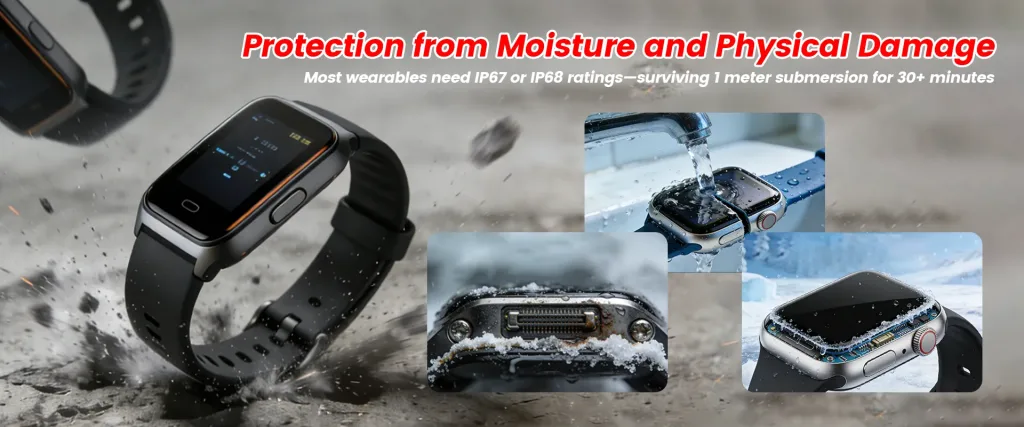
Sweat contains salt that corrodes contacts and solder joints. Moisture from hand washing, rain, or swimming seeps into gaps. Body oils interfere with connections. Devices experience constant impacts and drops. Temperature shifts stress components. Most wearables need IP67 or IP68 ratings—surviving 1 meter submersion for 30+ minutes.
The table below outlines environmental protection requirements and testing standards for wearables:
| Protection Level | Dust Resistance | Water Resistance | Test Duration | Typical Applications | Cost Impact |
|---|---|---|---|---|---|
| IP54 | Dust protected | Splash resistant | N/A | Basic fitness bands | Baseline |
| IP67 | Dust-tight | 1m submersion | 30 minutes | Standard smartwatches, fitness trackers | 1.3-1.5x |
| IP68 | Dust-tight | 1.5m+ submersion | 60+ minutes | Swim-capable watches, rugged wearables | 1.5-2x |
| Medical grade | Dust-tight | Sterilization capable | Varies | Medical monitoring devices | 2-3x |
Add thin protective layers over assembled boards. Choose acrylic for easy application, silicone for temperature extremes, urethane for chemical resistance, or parylene for best moisture protection. Apply 25-75 micron thickness after soldering. Parylene (5-25 microns) provides superior protection but needs vacuum equipment. Cover solder joints, component bodies, and exposed copper completely.
Choose LEDs with integrated silicone or epoxy sealing that blocks water from reaching internal connections. Expect 20-40% higher cost than standard LEDs, but eliminate a major failure point. Verify specs confirm continuous submersion capability, not just splash resistance. Request test data showing performance after extended moisture exposure.
Build joints that handle constant flexing and vibration. Use lead-free SAC305 alloy (96.5% tin, 3% silver, 0.5% copper) for good mechanical strength. Create generous fillets instead of minimal joints to distribute stress. Design PCB pads with rounded corners instead of sharp angles where cracks start. Use pad sizes slightly larger than minimum specs for more bonding area.
Fill voids around LEDs and circuits with two-part silicone or polyurethane. Choose silicone for flexibility through temperature changes. Consider overmolding where plastic is injection-molded around the entire assembly for complete sealing. Match potting material thermal expansion to PCB and components to prevent stress.
Validate protection before production. Run vibration testing at 10-50 Hz to simulate months of wear in hours. Drop test from 1-2 meters onto hard surfaces from multiple angles. Temperature cycle between -20°C and 60°C for 100-500 cycles to stress joints and reveal coating failures. Test submersion beyond your target—test to 1.5m if targeting IP67. Check electrical function during and after submersion.
Test materials that touch skin for irritation and allergic reactions. Use medical-grade silicone or proven urethane formulations with safety records. Get ISO 10993 biocompatibility certification for materials in direct skin contact. Test long-term wear since coatings can wear through over time.
Submit to certified labs for official IP rating verification. Design complete sealing with gaskets at enclosure joints, sealed buttons, and waterproof charging ports. Ensure PCB coatings, component seals, and enclosure gaskets work together. IP67 requires dust-tight construction plus 1 meter submersion for 30 minutes. IP68 typically means 1.5 meters for 60 minutes, though exact specs vary.
Protecting wearable LEDs needs several methods working together. Start with sealed LED components and conformal coating. Add strong solder joints and potting where needed. Design the complete enclosure with proper gaskets and seals. Test beyond your target specs—if you need IP67, test to IP68. Each method handles different failure modes. Test early and thoroughly to prevent expensive field failures.

LED manufacturing creates color variations. Manufacturers sort LEDs into 10-20 different “bins” per production run. Mixed bins cause visible color mismatches. Temperature shifts color—white LEDs turn yellow when hot, RGB LEDs shift 5-10 nanometers. Phosphors degrade over time, permanently changing color. For health sensors, color accuracy is critical because different wavelengths penetrate skin differently and affect measurements.
The table below shows color tolerance specifications and their applications:
| LED Quality Grade | Wavelength Tolerance | Typical Binning | Brightness Variation | Cost Premium | Best Applications |
| Standard consumer | ±10-15nm | Mixed bins acceptable | ±20-30% | Baseline | Simple indicators, single-color status lights |
| Premium consumer | ±7-10nm | Single bin preferred | ±15-20% | 1.2-1.5x | RGB notifications, display backlighting |
| Industrial grade | ±5-7nm | Single bin required | ±10-15% | 1.5-2x | Color-critical displays, multi-LED arrays |
| Medical grade | ±3-5nm | Tight single bin | ±5-10% | 2-3x | Pulse oximetry, health sensors |
Specify exact bin codes by wavelength (nanometers) and brightness instead of accepting mixed bins. Order all LEDs for a production run from the same bin to guarantee color consistency. Expect 10-30% cost increase and longer lead times. For high volumes, reserve entire bins with manufacturers for your project. Keep bin code records for consistent reordering.
Install automated spectrophotometers that measure each LED’s actual color during assembly. Capture precise wavelength and brightness values for every device. Store calibration data in non-volatile memory. Program firmware to adjust LED current based on stored values, compensating for variations. Accept higher production cost for ability to use mixed bins while maintaining consistent output.
Place temperature sensors next to LEDs to monitor heat. Add control circuits that adjust LED current based on measured temperature. Create lookup tables mapping temperature to required current adjustments for stable color. Use this for RGB notification lights and applications needing consistent color during extended use. Test compensation across full operating temperature range.
Specify medical-grade LEDs with ±3-5nm wavelength tolerance for pulse oximetry and health sensors. Verify dominant wavelength specs in datasheets, not just typical values. Check color rendering index (CRI) for white LEDs in medical applications. Accept higher costs for measurement accuracy. Request manufacturer certification and traceability for medical-grade parts.
Use calibrated spectrophotometers to measure color coordinates from each production batch. Test all three colors individually for RGB LEDs and verify white balance. Set acceptable color ranges and reject batches outside specs. Document baseline measurements to detect color drift in later production. Inspect incoming LED deliveries to catch bin mixing before assembly.
Select LEDs from manufacturers with documented aging and color shift data. Design for lower operating currents to reduce phosphor degradation. Limit LED junction temperatures through thermal management to slow aging. Consider periodic recalibration for critical applications. Set realistic expectations for color shift over warranty period based on manufacturer data.
Specify appropriate LED grades and bin controls—medical sensors need tighter tolerances than status indicators. Add calibration during production if budget allows, and temperature compensation where thermal effects matter. Use measurement-based testing, not visual inspection. Test color consistency under actual operating conditions including temperature extremes and extended runtime.
Integrating SMD LEDs into wearable devices requires planning from the first design stages through production. Your success depends on choosing the right components, working with reliable suppliers, doing thorough testing, and meeting regulatory requirements.
List exactly what you need from your LEDs before selecting components. Create a requirements checklist covering these areas:
| Specification | Typical Range |
| Brightness (outdoor) | 500-1000 mcd |
| Brightness (indoor) | 100-200 mcd |
| Current per LED | 2-20 mA |
| Viewing angle | 120-160° |
| Operating temperature | -20°C to 60°C |
| Maximum skin temperature | 40-45°C |
| IP rating | IP67/IP68 |
| Color wavelength | Specify ±5-10nm |
Test your LED setup with prototypes that match actual conditions, not just workbench testing. Follow these steps:
1) Use the same PCB material and thickness you’ll use in production since heat dissipation changes between different board types.
2) Include the actual enclosure, display cover, and any light guides or diffusers.
3) Run LEDs at real operating currents and duty cycles instead of just maximum power.
4) Wear prototypes yourself for hours at a time to find comfort problems, hot spots, or visibility issues.
5) Have multiple people test them, especially those with different skin tones for optical sensors.
6) Make at least 10-20 units to spot manufacturing problems and see how much components vary.
Your LED supplier choice affects both quality and supply reliability. Check these factors when evaluating suppliers:
Testing needs to match how people actually use your device. Run these essential tests:
| Test Type | Parameters | Duration/Cycles |
| Accelerated aging | 60-85°C elevated temperature | 500-1000 hours |
| Vibration | 5-50 Hz (body movement) | 8-24 hours |
| Drop test | 1-2 meter height, hard surface | 20-50 drops |
| Water submersion | 1.5m depth (exceed IP67) | 60+ minutes |
| Temperature cycling | -20°C to 60°C | 100-500 cycles |
| Sweat exposure | Artificial sweat solution | 168+ hours |
| Sensor accuracy | Multiple skin tones | Per application |
Certifications vary by market and product type. Plan for these key standards:
1) FDA clearance (US medical devices): Need 510(k) clearance or approval based on device classification—expect 6-12 months for approval.
2) CE marking (Europe): Required for European sales, covers electrical safety and electromagnetic compatibility.
3) FCC certification (US): Proves devices don’t create radio interference—needed for wireless features.
4) IEC 62471 (eye safety): Check if your LED wavelengths require photobiological safety testing.
5) ISO 10993 (skin safety): All materials touching skin need biocompatibility testing.
6) RoHS (hazardous materials): Restricts certain substances in electronics for most major markets.
Begin regulatory work early since certification usually takes 3-12 months and often requires design modifications.
Balance price with reliability using these approaches:
These practices work together as a complete system. Skipping steps to save time or money early usually costs more later when you hit problems in production or field failures after launch.
Working with SMD LEDs in wearable devices means dealing with power limits, thermal constraints, precision assembly, environmental exposure, and color variations. Fortunately, proven solutions exist for each obstacle—you just need to apply them at the right development stage. Plan your LED specs carefully, prototype with actual materials and conditions, and run proper validation tests before committing to production. Taking time to address these challenges early saves you from expensive redesigns and field failures later.
At HQG Optoelectronics, we’ve spent over 20 years perfecting LED components for demanding applications like wearable technology. Our expertise goes beyond manufacturing—we work with you to solve the real challenges your design faces.
What makes our LEDs ideal for wearables:
1. Ultra-compact sizes (0402-0805): Fit perfectly into tight spaces without compromising performance
2. Low-power consumption (2-5mA): Extend your device’s battery life significantly
3. Precision wavelength control (±5nm): Deliver medical-grade color accuracy through custom binning services
4. Durability ratings (IP67/IP68): Withstand sweat, water submersion, and daily wear conditions
5. Fast delivery: In-stock items ship within 48 hours to keep your project on schedule
How we support your project:
Our on-site engineering teams work directly alongside production, giving you real-time technical guidance when you need it. Whether you’re selecting components, optimizing thermal management, or troubleshooting design challenges, we provide practical solutions that prevent costly delays. We’ve helped countless projects transition smoothly from prototype to full-scale production.
Ready to discuss your wearable technology needs?
Contact us today to find LEDs that perform reliably in real-world conditions:
📧 Email: marketing005@hqgled.com
💬 WhatsApp: +86 135-1027-0516
Visit our website to explore our complete SMD LED catalog and discover how our precision engineering can power your next innovation.